

Google Ads Agency
We don't just run ads.
We grow businesses.
Most agencies optimise ads and stop there. We look at the full picture: account structure, landing pages, tracking, and strategy. That's where the real savings are.Running Google Ads is not enough. The account structure, the landing pages, the conversion tracking, the strategy behind every dollar spent. That's what separates wasted budget from real growth.
No obligation. No sales pitch. Just an honest look at your account.

$0M+
in managed ad spend
0+
accounts audited
$0M+
in managed ad spend
0+
accounts audited
What are common Google Ads problems?
You're getting results, but something tells you it could be done better.
You suspect juniors are running your account.
Your conversions probably aren't set up properly.
Your agency isn't transparent about what they're doing.
What we typically findThe average account wastes 30-50% of spend on irrelevant/non-converting terms
57%
irrelevant/non-converting search terms
82%
of accounts have incorrect conversions
$27K+
wasted keyword spend
0
negative keyword lists
What other agencies don't do
Are you paying for traffic that's already yours?
Most agencies never check your organic rankings. If you're ranking on page one for a keyword and still bidding on it, that's money going straight to Google for no reason. We cross-reference your paid and organic data to find where budget is being wasted on traffic you'd get for free. We built an in-house tool to solve this that no other agency has.  I built the Search Incrementality Tool to map paid keywords against organic rankings in real time and flag every overlap.
Tap each to see details
Get a free Google Ads audit in only 9 hours
Find wasted spend. Get a clear fix.
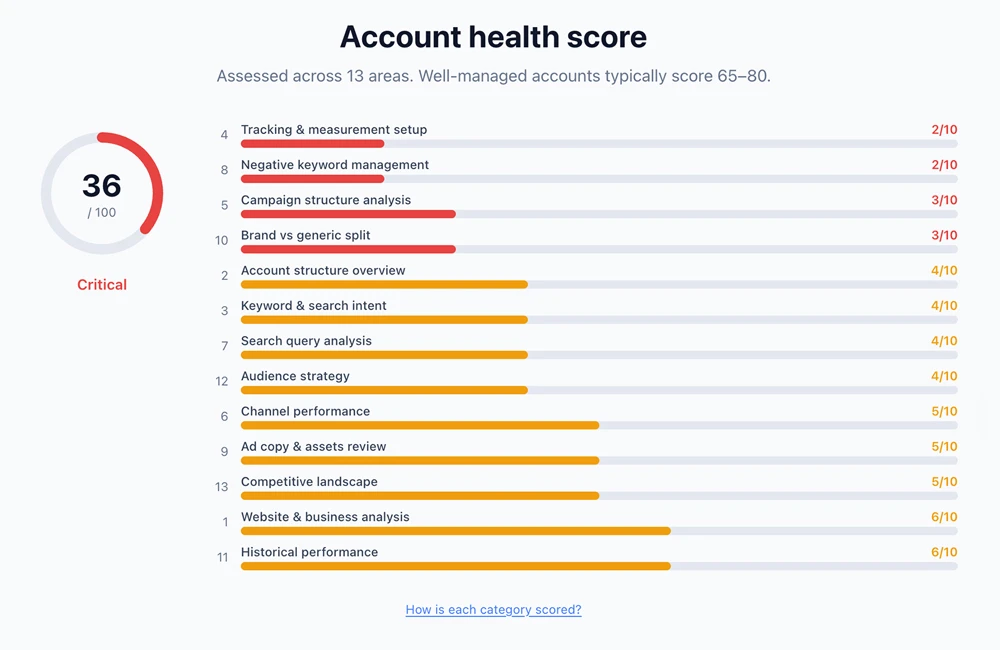
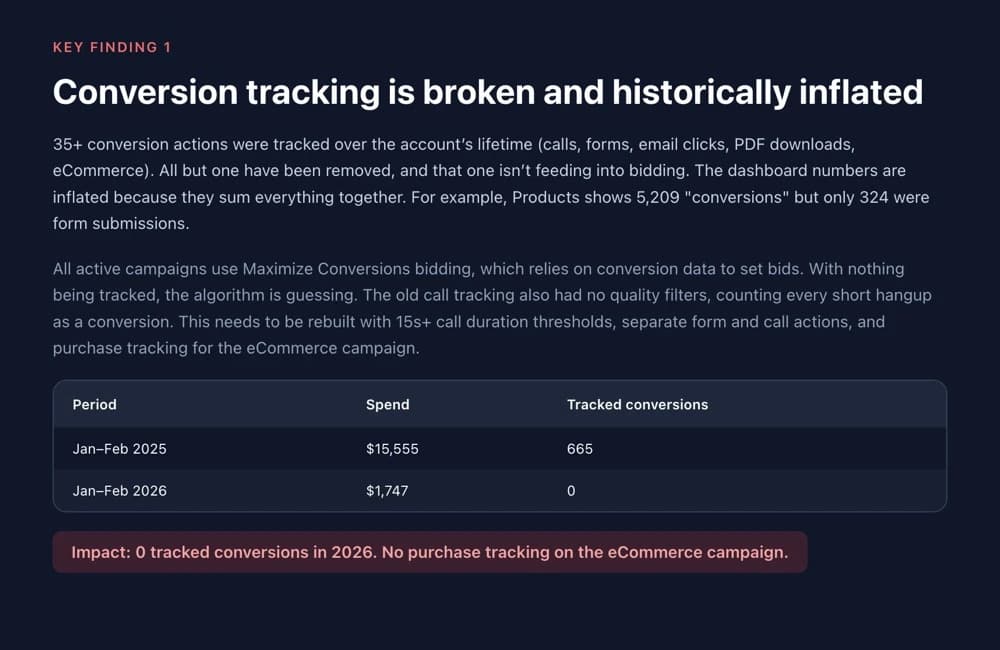

Real findings from a recent Google Ads audit
Our Google Ads Waste Finder audit covers
Website & business analysis
Account structure overview
Keyword & search intent
Tracking & measurement setup
Campaign structure analysis
Channel performance
Search query analysis
Negative keyword management
Ad copy & assets review
Brand vs generic split
Historical performance
Audience strategy
Competitive landscape
*9-hour turnaround applies to accounts averaging $3,000+/month over the past 12 months. Turnaround begins from the moment we receive read-only access. Full terms.
Common findings we uncover in our audit
- 30-50% of ad spend going to irrelevant search terms
- Conversion actions counting the same lead multiple times
- Smart bidding running on bad data, inflating costs
- 20-40% of budget wasted on brand keywords you'd rank for organically

How does Google Ads management work?
Most agencies optimise your campaigns and stop there. We guide the full journey, from account structure and ad copy to landing pages and conversion tracking, so every dollar works harder.

Optimised Account Structure
Campaign architecture built for your business model
High Value Keywords
Keywords that are highly relevant to you and not wasted
A/B Tested Ad Copy
Relevant copy designed to create action. Continuous testing
Converting Landing Pages
Pages designed to convert, not just receive clicks
Conversion Tracking
Every lead, call, and sale tracked accurately
Bidding Strategy
AI-enhanced bidding aligned to your margins
Ongoing Optimisation
Weekly refinements, monthly optimisations, not set-and-forget
When every piece works together, your cost per lead drops and your revenue scales.
Proprietary Technology
Meet OptiMate

Our AI engine analyses your campaigns 24/7 — adjusting bids in real time, detecting trends early, and cross-referencing organic vs paid to eliminate waste. While other agencies hand your account to juniors and check in weekly, OptiMate runs deep analytics every hour, surfacing insights and executing optimisations automatically.
Proprietary Technology
Meet OptiMate
Your account doesn't sleep, and neither does OptiMate. Our AI engine continuously analyses your campaigns, adjusting bids in real time, identifying emerging trends before they become costly, and cross-referencing organic rankings against paid spend to eliminate waste.
While some other agencies review accounts once every week, sometimes every month with a junior, OptiMate runs deep-dive analytics every hour, surfacing actionable insights, flagging budget anomalies, and executing optimisations automatically.
How we get results
Millions of dollars in managed Google Ads spend and years of experience, built into AI tools that work 24/7. While other agencies hand your account to juniors, our team is backed by systems with expertise built from thousands of accounts, an edge no competitor can match.
Swipe to explore
Google Ads Audit
Audit tool13-step account audit covering structure, keywords, conversion tracking, search query waste, ad copy, and competitive landscape.
Negative Keyword Sweep
Automation toolAutomated scan that identifies wasted spend on irrelevant search terms and builds negative keyword lists to plug the leaks.
OptiMate
AI toolAI-powered optimisation engine that analyses your account data and executes bid adjustments, budget shifts, and keyword refinements.
Search Incrementality
Analytics toolCombines Google Search Console and Google Ads data to show which paid clicks are truly incremental and which cannibalise organic.
Budget Monitor
Automation toolReal-time tracking of spend against budget limits. Automatically pauses or reduces campaigns that are overdelivering.
Performance Dashboard
Reporting toolLive dashboard with auction insights, impression share tracking, quality score monitoring, and custom performance notes.
Google Ads Audit
Audit tool13-step account audit covering structure, keywords, conversion tracking, search query waste, ad copy, and competitive landscape.
Negative Keyword Sweep
Automation toolAutomated scan that identifies wasted spend on irrelevant search terms and builds negative keyword lists to plug the leaks.
OptiMate
AI toolAI-powered optimisation engine that analyses your account data and executes bid adjustments, budget shifts, and keyword refinements.
Search Incrementality
Analytics toolCombines Google Search Console and Google Ads data to show which paid clicks are truly incremental and which cannibalise organic.
Budget Monitor
Automation toolReal-time tracking of spend against budget limits. Automatically pauses or reduces campaigns that are overdelivering.
Performance Dashboard
Reporting toolLive dashboard with auction insights, impression share tracking, quality score monitoring, and custom performance notes.
Google Ads Audit
Audit tool13-step account audit covering structure, keywords, conversion tracking, search query waste, ad copy, and competitive landscape.
Negative Keyword Sweep
Automation toolAutomated scan that identifies wasted spend on irrelevant search terms and builds negative keyword lists to plug the leaks.
OptiMate
AI toolAI-powered optimisation engine that analyses your account data and executes bid adjustments, budget shifts, and keyword refinements.
Search Incrementality
Analytics toolCombines Google Search Console and Google Ads data to show which paid clicks are truly incremental and which cannibalise organic.
Budget Monitor
Automation toolReal-time tracking of spend against budget limits. Automatically pauses or reduces campaigns that are overdelivering.
Performance Dashboard
Reporting toolLive dashboard with auction insights, impression share tracking, quality score monitoring, and custom performance notes.
Google Ads Chat
AI toolConversational AI interface that lets us query your account data in natural language for faster insights and recommendations.
Campaign Proposal Builder
Strategy toolGenerates campaign structure proposals based on audit findings, keyword research, and your business model.
Keyword Planner
Free toolPulls keyword ideas from Google Ads API, groups them by intent and service category, and maps them to your landing pages.
Try it free here →
Content Optimiser
CRO toolCompares your landing pages against the top 5 ranking competitors for any keyword. Grades content quality and highlights gaps.
Conversion Rate Audit
Free toolFree website conversion rate audit that analyses your pages, user experience, and conversion paths to find where you're losing leads.
Try it free here →
SEO Audit
Free toolComprehensive site audit covering technical SEO, on-page optimisation, content quality, and competitor benchmarking.
Try it free here →
Competitor Analysis
Research toolDiscover competing keywords, monthly traffic estimates, live Meta ads, and traffic channel breakdowns for any competitor.
Google Ads Chat
AI toolConversational AI interface that lets us query your account data in natural language for faster insights and recommendations.
Campaign Proposal Builder
Strategy toolGenerates campaign structure proposals based on audit findings, keyword research, and your business model.
Keyword Planner
Free toolPulls keyword ideas from Google Ads API, groups them by intent and service category, and maps them to your landing pages.
Try it free here →
Content Optimiser
CRO toolCompares your landing pages against the top 5 ranking competitors for any keyword. Grades content quality and highlights gaps.
Conversion Rate Audit
Free toolFree website conversion rate audit that analyses your pages, user experience, and conversion paths to find where you're losing leads.
Try it free here →
SEO Audit
Free toolComprehensive site audit covering technical SEO, on-page optimisation, content quality, and competitor benchmarking.
Try it free here →
Competitor Analysis
Research toolDiscover competing keywords, monthly traffic estimates, live Meta ads, and traffic channel breakdowns for any competitor.
Google Ads Chat
AI toolConversational AI interface that lets us query your account data in natural language for faster insights and recommendations.
Campaign Proposal Builder
Strategy toolGenerates campaign structure proposals based on audit findings, keyword research, and your business model.
Keyword Planner
Free toolPulls keyword ideas from Google Ads API, groups them by intent and service category, and maps them to your landing pages.
Try it free here →
Content Optimiser
CRO toolCompares your landing pages against the top 5 ranking competitors for any keyword. Grades content quality and highlights gaps.
Conversion Rate Audit
Free toolFree website conversion rate audit that analyses your pages, user experience, and conversion paths to find where you're losing leads.
Try it free here →
SEO Audit
Free toolComprehensive site audit covering technical SEO, on-page optimisation, content quality, and competitor benchmarking.
Try it free here →
Competitor Analysis
Research toolDiscover competing keywords, monthly traffic estimates, live Meta ads, and traffic channel breakdowns for any competitor.
13 specialised tools. Built in-house. Always running.
How we compare to the typical agency
Account management
Typical agency
Junior account managers learning on your budget
Optimise Digital
Senior strategists using proprietary AI tools running 24/7
Conversion tracking
Typical agency
Assume it's set up. Rarely verified
Optimise Digital
We audit, fix, and validate your conversion tracking ourselves
Landing pages
Typical agency
Not their problem. They only focus on ads and spend
Optimise Digital
Full landing page audits with actionable recommendations per campaign
Organic search
Typical agency
Only look at paid. Ignore organic entirely
Optimise Digital
We analyse organic traffic too, so you're not paying for clicks you'd get for free
Reporting
Typical agency
Generic monthly PDF with vanity metrics
Optimise Digital
Live dashboard with ROAS, CPA, and conversion data tailored to what's important to you
Optimisation
Typical agency
Set-and-forget. Checked once a week, maybe
Optimise Digital
OptiMate runs hourly deep analytics and auto-optimises
Transparency
Typical agency
Often unclear on where the budget went and why
Optimise Digital
Every dollar accounted for. No hidden markups
Account ownership
Typical agency
Agency owns the account. You leave, you lose everything
Optimise Digital
Your account. We build it, you keep it
Contracts
Typical agency
12-month lock-in with exit fees
Optimise Digital
Month-to-month after 90-day onboarding
What happens in the first 90 days of Google Ads management?
What to expect if you start work with us
Audit & Quick Wins
Before we even talk about working together, you get a clear summary of your Google Ads account. Our 13-step Google Ads Waste Finder audit covers where money is being wasted, what quick wins are available right now, and an honest assessment of your account's potential. If we don't think we can improve your results, we'll tell you that too.
Deep-Dive Strategy
Once you decide to work with us, we sit down together and go deeper than the initial audit. Every campaign, keyword, ad group, search term, conversion action, and ad quality is analysed in detail. Working closely with your team, we build a full action plan with prioritised opportunities, projected impact, and a clear roadmap for execution.
Build & Optimise
We execute on every recommendation from the strategy phase. Campaigns are rebuilt or restructured, tracking is fixed, and the quick wins are shipped first so you see results early. You also receive tailored landing page recommendations specific to each campaign, showing exactly what to improve to increase your conversion rate.
Best Practice, Ready to Scale
With the foundations in place, we fine-tune the account to the way Google rewards. Maximum relevancy, highest quality scores, and tightest keyword-to-ad-to-landing-page alignment. By the end of 90 days your account is at best practice and built to scale profitably.
What our clients say
“We'd worked with countless agencies who just pushed ads with little return, but Optimise took the time to fix the fundamentals first. After one year, our website conversion rate is up 44% and total revenue has grown by 60%.”
Jason
Owner, Profiterole Patisserie
“Working with the Optimise Digital team has been exceptional. Deep technical knowledge combined with real commercial acumen. They helped drive £100M in growth over three years, constantly innovating paid media to stay ahead of competition.”
Jessica Taxell
Digital & Marketing Director, AllSaints
“I've worked with the Optimise team across SEO, Google and Meta at my previous company, so when we needed Google Ads support for two Questas Group businesses, we brought them on. They ran a full campaign analysis, restructured our accounts, fixed our conversion tracking, and got the fundamentals solid before we scaled. The difference between them and our previous agencies is night and day.”
Kay
Questas Group
“We'd worked with countless agencies who just pushed ads with little return, but Optimise took the time to fix the fundamentals first. After one year, our website conversion rate is up 44% and total revenue has grown by 60%.”
Jason
Owner, Profiterole Patisserie
Audit guarantee
If our free audit doesn't find at least one actionable improvement, we'll tell you straight. No spin, no upsell.
No lock-in after 90 days
After onboarding, leave with zero notice and zero exit fees. Your account, your data. You own everything we build.
Transparent Reporting
Transparent Google Ads reporting and dashboards
Built for decision-makers, not vanity metrics. See exactly where your ad spend goes and what it returns.
Spend
Conversions
Cost/Lead
ROAS
ROAS, cost per lead, conversion volume, and spend efficiency at a glance.
Monthly Actions
What we changed and what's nextGet a free Google Ads audit in only 9 hours
Find wasted spend. Get a clear fix.
Real findings from a recent Google Ads audit
Our Google Ads Waste Finder audit covers
Website & business analysis
Account structure overview
Keyword & search intent
Tracking & measurement setup
Campaign structure analysis
Channel performance
Search query analysis
Negative keyword management
Ad copy & assets review
Brand vs generic split
Historical performance
Audience strategy
Competitive landscape
*9-hour turnaround applies to accounts averaging $3,000+/month over the past 12 months. Turnaround begins from the moment we receive read-only access. Full terms.
Common findings we uncover in our audit
- 30-50% of ad spend going to irrelevant search terms
- Conversion actions counting the same lead multiple times
- Smart bidding running on bad data, inflating costs
- 20-40% of budget wasted on brand keywords you'd rank for organically
Questions people ask about Google Ads
Click any question to see our answer.
OptiMate
Online
Pick a question above to see the answer 👆
Work out your ideal Google Ads spend
Before setting a budget, you need to know what a customer is actually worth to you, and how much you're willing to pay to get one.
Know your customer value
How much does one customer spend with you over a year? If they buy once for $500, that's your value. If they come back monthly at $200 for 12 months, that's $2,400.
Decide what you'd pay for that customer
If a customer is worth $3,000 to you, would you pay $500 to get them? $300? That's your Cost Per Acquisition (CPA).
That's your Google Ads target
Your CPA tells you what to aim for. If your CPA is $300 and you want 10 customers a month, your budget is $3,000/month.
Hitting your CPA takes more than good ads. Your landing page, trust signals, and site experience all affect whether a click converts. If these are weak, your cost per lead rises regardless of campaign quality.
Calculate your target CPA
For retainers, enter the monthly fee.
One-off purchase = 1. Monthly retainer = 12.
Most businesses spend 15-25% of customer value to acquire them.
Management fee
Starting from. Final quote based on account complexity and scope.
No lock-in contracts. Month-to-month after onboarding.
Your account, your data. You own everything.
No hidden fees or markup on ad spend.
Typical monthly ad spend by business type
Service business
$1,500 - $5,000/mo
Multi-location / franchise
$5,000 - $15,000/mo
E-commerce (DTC)
$3,000 - $50,000/mo
B2B lead generation
$2,000 - $10,000/mo
These are typical ranges, not requirements. We'll recommend the right budget during the strategy call.
Google Ads for ecommerce and lead generation
Different business models need different approaches.
B2C Lead Generation
Specialised trades, finance, health & wellness
Your customers search Google when they need you. We don't just take care of ads, we look at the entire journey from ad to landing page conversion rate to actual lead. The right message, at the right moment, sent to a page that converts and builds trust.
What we measure
E-commerce
DTC brands, retail
Every client gets access to our in-house product feed optimiser, the same capability companies pay feed providers $40-50k a year for. Combined with our proprietary tROAS-less bid strategies that consistently outperform Google's automated bidding, we structure your campaigns to maximise ROAS while scaling profitably.
What we measure
Your ads are only as good as your landing page
The best ad strategy won't save a landing page that doesn't convert. Find out if yours is ready with our free AI-powered audit.
- AI-powered page analysis
- Conversion gap detection
- Trust signal review
- Actionable recommendations
How to get started with Google Ads management
Three steps. No commitment. You'll know if we're the right fit before spending a dollar.
Grant us read-only access
Share your Google Ads account with viewer access. Takes 2 minutes. We only request read-only access.
Read-only. No changes, no risk.
Get your audit in 3 hours
Your account structure, wasted spend, and tracking are all analysed. Full written analysis included.
A specific analysis of your account.
Strategy call
We walk through the findings, where money is being wasted, and what the opportunity looks like.
Completely optional.
How to share read-only access (under 1 minute)
Go to Admin → Access & Security
In your Google Ads account, click the settings icon, then Admin, then Access & Security.
Add us with read-only access
Invite hello@optimisedigital.online with "Read only" selected.
Admins will receive an email when new users are added.
No contracts. No obligation.
Free Google Ads Audit
Get in touch about Google Ads management
Our 13-step Google Ads Waste Finder Audit.
Google Ads insights from our team
Strategies, analysis, and lessons from managing real campaigns

Should I Run Google Ads for My Business in 2026?
Should I Run Google Ads for My Business in 2026? A Practical Guide for Growth

How to work out how much you should spend on Google Ads each month
How to work out how much you should spend on Google Ads each month

Time vs money, the real decision behind every growth strategy
Business growth comes down to time or money. Learn how to balance SEO, referrals, and paid ads for scalable growth.

How some major brands waste millions on Google Ads
Brands waste millions bidding on their own name in Google Ads while ranking #1 organically. Learn how blended search analysis exposes the waste.

How to know if your Google Ads agency is actually doing a good job
Paying a Google Ads agency but unsure if the work is good? Use this 13 step Google Ads audit checklist to validate performance and find red flags.
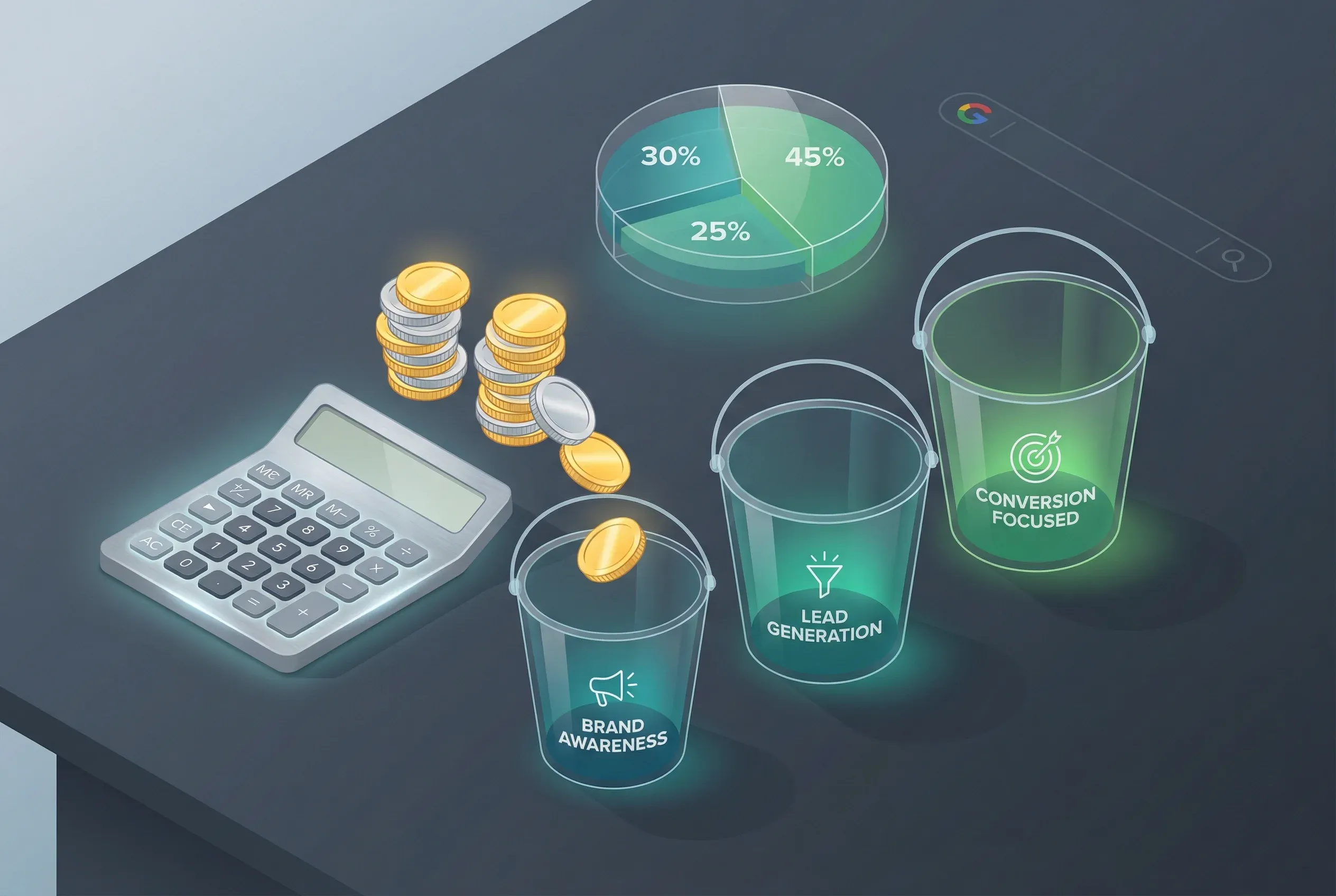
Deciding your Google Ads budget: a guide for small to medium business owners
Determining your Google Ads budget doesn't have to be complicated. Follow these seven steps to set a budget that works for your business.
Other channels to maximise growth
Google Ads drives traffic, but real growth comes from every channel working together.
SEO
Combine paid and organic to reduce acquisition costs over time.
Conversion Rate Optimisation
Get more leads from the same traffic by optimizing your conversion paths.
Facebook & Instagram Ads
Reach customers before they search with demand-generation campaigns.
Integrated Digital Growth
A unified strategy that connects all your channels for compounding growth.